How to build a blog in 2026
Using Astro, Cloudinary, custom Markdown plugins, Cloudflare, custom WYSIWYG editor, XSLT
I built my previous blog in 2019 and it was starting to feel clumsy and archaic. It was a great first learning experience, but the pain points were accruing and I was ready to iterate with some of the lessons learned.
Platform
This was my most pressing need as I was still on Next.js’s old Pages Router, and was finding it a miserable experience. At times I was plagued by compatibility issues with Netlify’s adapter, and I could never quite figure out how to get 404 pages to work. LLM assistance was also wildly inconsistent.
I’ve long desired to switch to Astro for a more delightful and focused experience. I have no need for the additional bloat that Next.js is great for: dynamic server components, middleware, proprietary image optimization, etc. I just want a simple static blog.
Authoring experience
Although I enjoy having my blog posts be simple markdown files at rest, my previous workflow felt too technical. I was writing blog content in VS Code, jumping between writing prose and muddling around with markdown / MDX / HTML.
I eventually gravitated towards authoring elsewhere and then pasting the content in as a last step, but it still required processing my text back into the appropriate Markdown/MDX and this was a big point of friction that caused me to write less.
I’ve since realized I much prefer a more natural WYSIWYG text-editor experience.
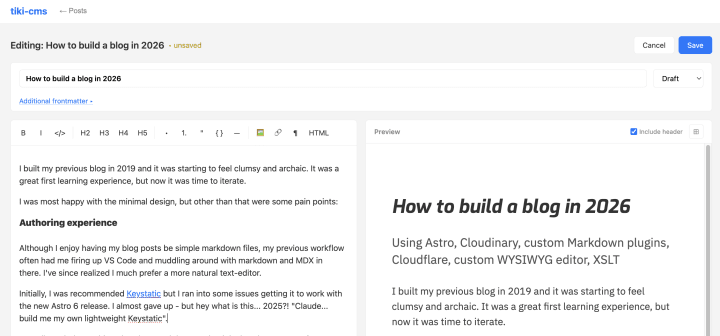
Initially, I was recommended Keystatic for this but I ran into some issues getting it to work with the new Astro 6 release (something to do with Vite’s virtual modules). I almost gave up — but hey, what is this… 2025?! “Claude… build me my own lightweight version of Keystatic”.
10 minutes later we have this:
Using a CDN to host assets
I never ironed out a good story for image hosting on my previous blog, and did not use a dedicated CDN. Honestly, this was never too big an issue, since my site was also static and hosted on a CDN.
I’ve now switched to Cloudinary. With this I unlock the ability to do dynamic cropping / resizing while still having aggressive caching. It also allows me to add more video to this site in the future, something I am keen on doing.
My repo still hosts the image assets, so I can still see them in the previews on Github for the markdown files, there is now just an easy npm run sync:assets step to deploy it for prod. I also have a lint step to ensure that all assets are synced when deploying to production.
MDX vs. custom markdown extensions
With the rise of agentic coding, I’m excited by the possibility of trivially creating customized extensions to Markdown (I will write more about this in a future post). Particularly, I like to add side notes in the margins for my post, and I wanted an easy way to do this by extending markdown itself.
What I’m most proud about my implementation is that the syntax piggybacks on standard Markdown:
- A link like
[visible text](>note-id)marks where the marginalia should appear - A fenced code block with the language set to
>note-iddefines the marginalia’s content. This can be anywhere on the page, and the parser will smartly colocate it when rendering
This way, the rendering “degrades” nicely, e.g. when the markdown page is rendered in Github.
RSS
Initially RSS was an afterthought for my blog, and I added it in late. I’ve since become an extremely vocal champion for RSS as an alternative to the hyper-engineered, addictive, and often toxic social media feeds. I also prefer push-based information instead of pull-based.
I wanted to design this blog to be ready to meet readers in the reader of their choice. No one should have an obligation to come here to read the content. I also had Claude Code make a custom XSLT stylesheet for my RSS feed so that it looks pleasant, on brand, and is educational. You can check it out here: tikiver.se/rss.xml.
Hosting
For many years I was a beneficiary of Netlify’s gracious unlimited free plan for hosting static sites. I was even grandfathered in to the old plan after they changed their pricing model (which I was not aware of).
Well, unfortunately, I was using their website a few months ago, and decided to try out a new AI feature. What I didn’t realize at the time was that using this feature would irreversibly transition my account to their new pricing model — and their UX did not make this implication clear at all. I’m not sure if I would call this a dark pattern, but I certainly felt duped and frustrated after it. The new model offers free credits, but they are not enough for my usage across many sites, so it was time for a change. I have been using Cloudflare significantly over the past few months and have been pleased. This was an opportunity to transition to Cloudflare.
Social-First
OG image cards are absolutely essential these days to represent your brand well when shared on social media, iMessage, or elsewhere. npm run og:generate effortlessly handles this for me using Satori and @resvg/resvg-js.
Now that all the pieces are in place, the next chapter begins: actually writing something valuable that others read!
To kick things off, I plan on publishing every day for the next 20 days, so stay tuned.
Get the latest updates and news
New and featured essays sent directly to you. No spam, no fluff.